Best overall: virtual assistance. Best for confident writers: content editing; best for a minimal-equipment start: proofreading. These side hustle ideas from home turn existing skills into specific services; HustleForge helps you build a personalized plan around your skills, budget, time, and location.
- Virtual assistance leads these side hustle ideas from home for people who already organize tasks and communicate clearly.
- Choose content editing for rewriting skills, proofreading for detail work, or online tutoring for subject knowledge.
- HustleForge turns your constraints into a side-hustle plan covering your offer, pricing, and launch steps.
- Start with a defined service, a relevant sample, and a direct approach to a potential customer.
Why this matters
A business idea is not an offer. Someone still needs to understand what you do, what they receive, and why they should hire you.
Your 2026 starting point is the work you can deliver with your current equipment and schedule. Choose a service you can demonstrate before you spend money building a business around it. A clear sample gives a potential customer something concrete to evaluate.
The ranking below favors skill-based services you can deliver remotely. It does not rank earning potential or promise customer demand. Your first job is to test whether a specific customer wants a specific result.
What makes the best side hustle ideas from home
Use these criteria for your 2026 shortlist:
- Existing ability: You can show the skill now, without presenting unfinished learning as expertise.
- Defined customer: You can name the person or business that needs the work.
- Bounded deliverable: The customer receives something specific, not unlimited access to your time.
- Schedule fit: Calls, deadlines, and revisions fit the hours you actually have.
- Setup needs: Required equipment, software, and secure access fit your budget.
- First-customer path: You can identify a relevant person to approach with a sample or proposal.
Side hustle ideas from home at a glance
| Rank and idea | Best for | Standout feature | Key limitation |
|---|---|---|---|
| 1. Virtual assistance | Organized generalists | Turns administrative skills into bounded support tasks | Some clients need daytime availability |
| 2. Content editing | Confident writers | Improves existing drafts rather than starting from scratch | Revision scope needs a firm boundary |
| 3. Proofreading | Detail-focused readers | A narrow service with a visible sample | Does not include major rewriting |
| 4. Online tutoring | Strong subject explainers | Uses knowledge you can already teach | Requires scheduled sessions |
| 5. Presentation cleanup | Visually organized communicators | Produces a clear before-and-after sample | Cannot fix weak source information alone |
| 6. Spreadsheet cleanup | Methodical spreadsheet users | Delivers an organized file with clear rules | Sensitive data requires careful handling |
| 7. Short-form video editing | People comfortable editing footage | Produces a concrete finished asset | Equipment and revision demands matter |
| 8. Remote tech guidance | Patient troubleshooters | Helps customers complete a defined setup task | Access and security boundaries are essential |
| 9. Resume editing | Strong career communicators | Clarifies a document the customer already owns | Cannot promise interviews or job offers |
1. Virtual assistance: best for organized generalists
Virtual assistance means handling agreed administrative tasks remotely. Start with work you already understand, such as formatting documents, organizing meeting notes, or maintaining a task list. Avoid selling a vague promise to handle everything.
Customer and offer: Approach an independent professional with a recurring administrative backlog. Offer one defined task with a delivery deadline and clear handoff.
Virtual assistance pros:
- Uses organization and written communication.
- Supports narrowly scoped starter projects.
- Lets you demonstrate work with a sample checklist.
Virtual assistance cons:
- Some tasks require access to private information.
- Daytime response expectations can conflict with another job.
Setup and time: Confirm the client's software and availability requirements before agreeing. Separate scheduled availability from the time spent completing tasks.
Next action: Create a sample weekly task tracker and describe exactly what you would maintain.
Best for: Reliable organizers who enjoy follow-through.
Verdict: Buy into this idea if you can meet the response schedule.
2. Content editing: best for confident writers
Content editing improves structure, clarity, and flow in an existing draft. It is different from proofreading: you rearrange arguments, remove repetition, and identify missing explanations. The client remains responsible for supplying accurate source information.
Customer and offer: Approach a consultant or business owner who writes articles or newsletters. Offer an edit of a defined draft, with tracked changes and a short explanation of major revisions.
Content editing pros:
- Uses judgment rather than a new product inventory.
- Produces a visible before-and-after sample.
- Can focus on a subject you understand.
Content editing cons:
- Revisions expand without an agreed scope.
- Unfamiliar technical topics require additional research.
Setup and time: Check document access and revision expectations. Allow time to read the draft before promising a deadline.
Next action: Edit a piece you own and show why the changes improve it.
Best for: Writers who can explain their editorial decisions.
Verdict: Buy into this idea if your sample demonstrates clearer writing.
3. Proofreading: best for detail-focused readers
Proofreading checks spelling, punctuation, grammar, and consistency. Keep it separate from rewriting, fact-checking, and document design unless those services are explicitly included. A narrow scope makes the offer easier to explain.
Customer and offer: Approach someone preparing a newsletter, report, or website update. Offer a final language check of a named document before publication.
Proofreading pros:
- Starts with a document editor you already use.
- Produces easy-to-review marked corrections.
- Fits an asynchronous delivery model.
Proofreading cons:
- Concentration matters throughout the assignment.
- Customers can confuse proofreading with substantive editing.
Setup and time: Use a quiet work block and agree on a style preference. Document length alone does not reveal how difficult the work will be.
Next action: Build a sample showing corrections and a separate note identifying issues outside your scope.
Best for: Careful readers who enjoy consistency checks.
Verdict: Buy into this idea if you prefer precision over rewriting.
4. Online tutoring: best for strong subject explainers
Online tutoring helps a learner understand material and practice a skill. Choose a subject you can explain accurately, not simply one you once studied. Keep the lesson focused on learning rather than completing the student's assignment for them.
Customer and offer: Identify a learner with a specific gap. Offer a focused session on that topic, with practice questions and a summary of what to review next.
Online tutoring pros:
- Uses subject knowledge you already possess.
- Has a clearly identifiable learner.
- Lets you demonstrate your teaching approach.
Online tutoring cons:
- Sessions require mutually available hours.
- Subject knowledge does not automatically translate into teaching skill.
Setup and time: Check your internet connection, audio, and lesson materials. Include preparation and follow-up when deciding what you can deliver.
Next action: Prepare a sample explanation of one difficult concept.
Best for: Patient people who can adjust an explanation.
Verdict: Buy into this idea if you can teach, not just answer.
5. Presentation cleanup: best for visually organized communicators
Presentation cleanup makes existing slides easier to follow. Work on spacing, hierarchy, consistency, and the order of information. Do not promise to repair an argument when the client has not supplied the necessary facts.
Customer and offer: Approach a presenter with a completed draft. Offer to clean up a defined deck while preserving its meaning and identifying unclear sections.
Presentation cleanup pros:
- Makes your work visible in a sample.
- Uses familiar presentation software.
- Supports a deliverable with a clear endpoint.
Presentation cleanup cons:
- Missing content can delay completion.
- Design preferences can create extra revisions.
Setup and time: Confirm file compatibility and whether content changes are included. Review the deck before accepting the deadline.
Next action: Create an original sample slide, then show a cleaner version beside it.
Best for: People who can simplify information without distorting it.
Verdict: Buy into this idea if your improvements are easy to see.
6. Spreadsheet cleanup: best for methodical spreadsheet users
Spreadsheet cleanup organizes an existing file so someone else can use it. Examples include standardizing labels, checking formatting, and identifying duplicate entries. Stay within the functions you understand; do not sell advanced automation without the skill to maintain it.
Customer and offer: Approach someone managing a messy contact or project tracker. Offer a cleaned copy and a short explanation of the changes.
Spreadsheet cleanup pros:
- Produces a tangible deliverable.
- Uses repeatable organization rules.
- Allows a sample built with fictional data.
Spreadsheet cleanup cons:
- Incorrect changes can damage useful records.
- Personal or business data needs careful handling.
Setup and time: Work from a copy and agree on cleanup rules. Include checking time, not just editing time.
Next action: Create a fictional messy sheet and document your cleanup process.
Best for: Careful spreadsheet users who check their work.
Verdict: Buy into this idea if accuracy is your strongest habit.
7. Short-form video editing: best for footage editors
Short-form video editing turns supplied footage into a finished clip. Define the output format, caption requirements, and revision boundary before beginning. Editing does not include filming or writing a content strategy unless you agree otherwise.
Customer and offer: Approach someone who already records useful footage. Offer to edit a defined clip from their supplied material.
Short-form video editing pros:
- Creates a finished asset customers can inspect.
- Uses editing skills you can demonstrate.
- Separates production from filming when scoped clearly.
Short-form video editing cons:
- Large files can strain equipment and storage.
- Poor source footage limits the result.
Setup and time: Check your software, computer, storage, and export requirements. Review the source footage before committing.
Next action: Edit footage you own or have permission to use.
Best for: Editors who can work within a clear brief.
Verdict: Hold until your equipment and sample meet the required format.
8. Remote tech guidance: best for patient troubleshooters
Remote tech guidance helps a customer complete a defined setup task. Examples include explaining file organization or walking through familiar software settings. Limit your offer to systems you understand and actions you can explain safely.
Customer and offer: Approach someone struggling with a specific software task. Offer a guided session and written steps they can repeat afterward.
Remote tech guidance pros:
- Uses practical knowledge you already have.
- Solves a clearly described task.
- Leaves the customer with reusable instructions.
Remote tech guidance cons:
- Unfamiliar systems make scope unpredictable.
- Account access creates security responsibilities.
Setup and time: Confirm the device, software, and issue beforehand. Keep passwords private and avoid taking unnecessary access.
Next action: Write a plain-language guide for one familiar task.
Best for: Calm explainers with firm technical boundaries.
Verdict: Hold until you can define safe access and troubleshooting limits.
9. Resume editing: best for career communicators
Resume editing improves clarity, organization, and wording using the customer's real experience. Ask for evidence before adding achievements. Never invent qualifications, job duties, or results to make a document sound stronger.
Customer and offer: Approach a job seeker with an existing resume and a target role. Offer an edited document and questions about unclear experience.
Resume editing pros:
- Produces a defined written deliverable.
- Uses interviewing and editing skills.
- Helps clarify existing experience.
Resume editing cons:
- Career expectations can exceed the editing scope.
- Sensitive personal information requires care.
Setup and time: Agree on the target role and revision boundary. Include time for the customer to answer questions.
Next action: Build a clearly fictional sample without fabricated performance claims.
Best for: Editors who understand how to describe real work accurately.
Verdict: Buy into this idea if you can improve clarity without promising interviews.
How these ideas are ranked
Virtual assistance leads this 2026 ranking because it offers several narrowly defined starting points for organized generalists. Specialized services follow according to the skill required, setup needs, schedule restrictions, and scope risks described above.
This is a fit ranking, not an earnings forecast. A lower-ranked service you can demonstrate beats a higher-ranked service you cannot deliver.
Turn your choice into a first-customer offer
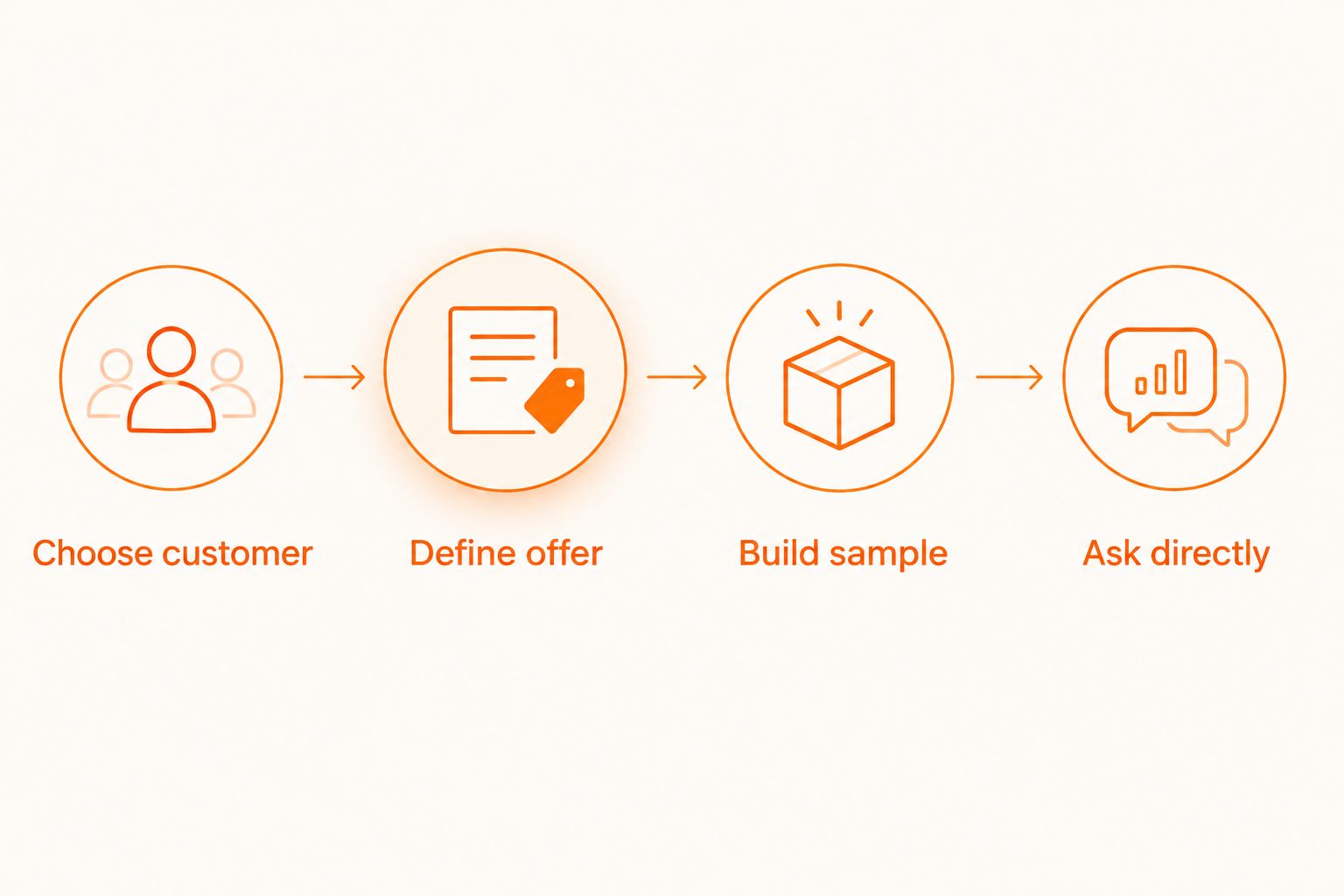
Use this illustrative planning exercise, not a delivery-time estimate. Adapt the blocks to your available hours in 2026.
- Choose customer: Spend 30 minutes identifying a customer type and a task you understand.
- Define offer: Spend 1 hour writing the deliverable, exclusions, deadline, and revision boundary.
- Build sample: Reserve 2 hours to produce an original example. Extend that block when the work requires it.
- Ask directly: Send a relevant prospect a short message describing the task and sample. Ask whether that task is a current priority.
Before quoting a price, list setup expenses and the time needed for delivery, communication, and revisions. Check software, equipment, payment arrangements, and any business requirements relevant to your location. Do not confuse money collected with money left after expenses.
HustleForge's free business generator creates a plan shaped by your skills, budget, time, transportation, and location. ChatGPT is an alternative for discussing an idea through prompts; a free business-idea list provides options to shortlist. Neither a generated plan nor a list proves customer demand. The optional Launch Blueprint is another planning option, not evidence that an offer will sell.
Which side hustle should you choose?
Choose virtual assistance if you are organized, comfortable communicating, and able to meet the client's schedule. Choose proofreading instead if you prefer quiet, bounded work. Choose tutoring if your strongest asset is explaining a subject clearly.
HustleForge's side-hustle planner is best for first-time builders who need an offer and launch steps shaped around their constraints. Your useful 2026 outcome is a testable offer, not a longer list of possibilities.
FAQ
What's the best side hustle to start from home?
Virtual assistance is the default recommendation for organized beginners who can meet a client's schedule. Choose a narrowly defined task and demonstrate it before offering broader support.
What side hustle can I start with skills I already have?
Start with a service that matches work you can already demonstrate. Writing supports editing or proofreading; subject knowledge supports tutoring; spreadsheet skills support file cleanup.
Can I start a home side hustle without buying equipment?
Choose a service compatible with the equipment and software you already own. Check the client's file formats, security needs, and delivery requirements before accepting the work.
How much time should I set aside for a side hustle?
Set aside time for preparation, customer communication, delivery, and revisions. The illustrative planning blocks in this guide are exercises, not estimates of how long paid assignments take.
How do I price my first service?
Define the scope and estimate the work before setting a price. Include setup expenses, communication, revisions, and delivery rather than charging around an undefined promise.
Is HustleForge better than ChatGPT for choosing a business?
HustleForge is designed to generate personalized side-hustle plans around the user's constraints. ChatGPT is an alternative for discussing ideas through prompts; choose based on the planning format you need, then test the offer with a potential customer.
How do I find my first customer from home?
Identify someone with the specific task your service addresses and approach them with a relevant sample. Ask whether the task is a current priority before proposing work.
One last thing
A first customer is not proof that every part of the offer works. After delivery, compare the actual work with your original scope. Tighten the offer before repeating it, especially where communication or revisions took more effort than expected.